
What Vibe Coding Actually Involves: 31% Human Judgment, No Code Written
31% of commits on a month-long AI build were pure human calibration — no new features, no code. Just judgment. Data and analysis of what the human role in vibe coding actually looks like.
Ten minutes.
That’s how long it took Claude Code to generate the first working version of Pomo — a native Mac Pomodoro timer. Seventeen files. 1,457 lines of Swift. Settings panel, menu bar integration, notification sounds, a full state machine. All of it, from a PRD I’d spent two hours writing.
Then I spent the next 50 hours making it the thing I actually wanted.
When it was done, I ran the numbers on my git history to find out what those 50 hours had actually been.
- 88 commits. One month. Zero Swift written by hand.
- 31% of all commits were pure calibration — no new features, no new code.
- The gap between “it works” and “it feels right” is irreducibly human.
What I Built
Pomo is a floating always-on-top timer widget for macOS. It lives as a circle on your screen, morphs into a rounded rectangle when you hover, and tracks focus sessions and breaks through a set of concentric animated rings.
No Swift written by hand. Claude Code (CC) wrote everything — textbook vibe coding (directing AI to write all the code, without writing any yourself). I reviewed, directed, and shipped.
The Breakdown
88 commits. January 24 to February 22. Here’s what they were:
| Category | Commits | Share |
|---|---|---|
| Fine-tuning / Iterating | 27 | 31% |
| Visual Design & Tokens | 22 | 25% |
| Core Features | 13 | 15% |
| Planning & Docs | 11 | 12% |
| macOS Native Integration | 11 | 12% |
| Code Org & Cleanup | 4 | 5% |
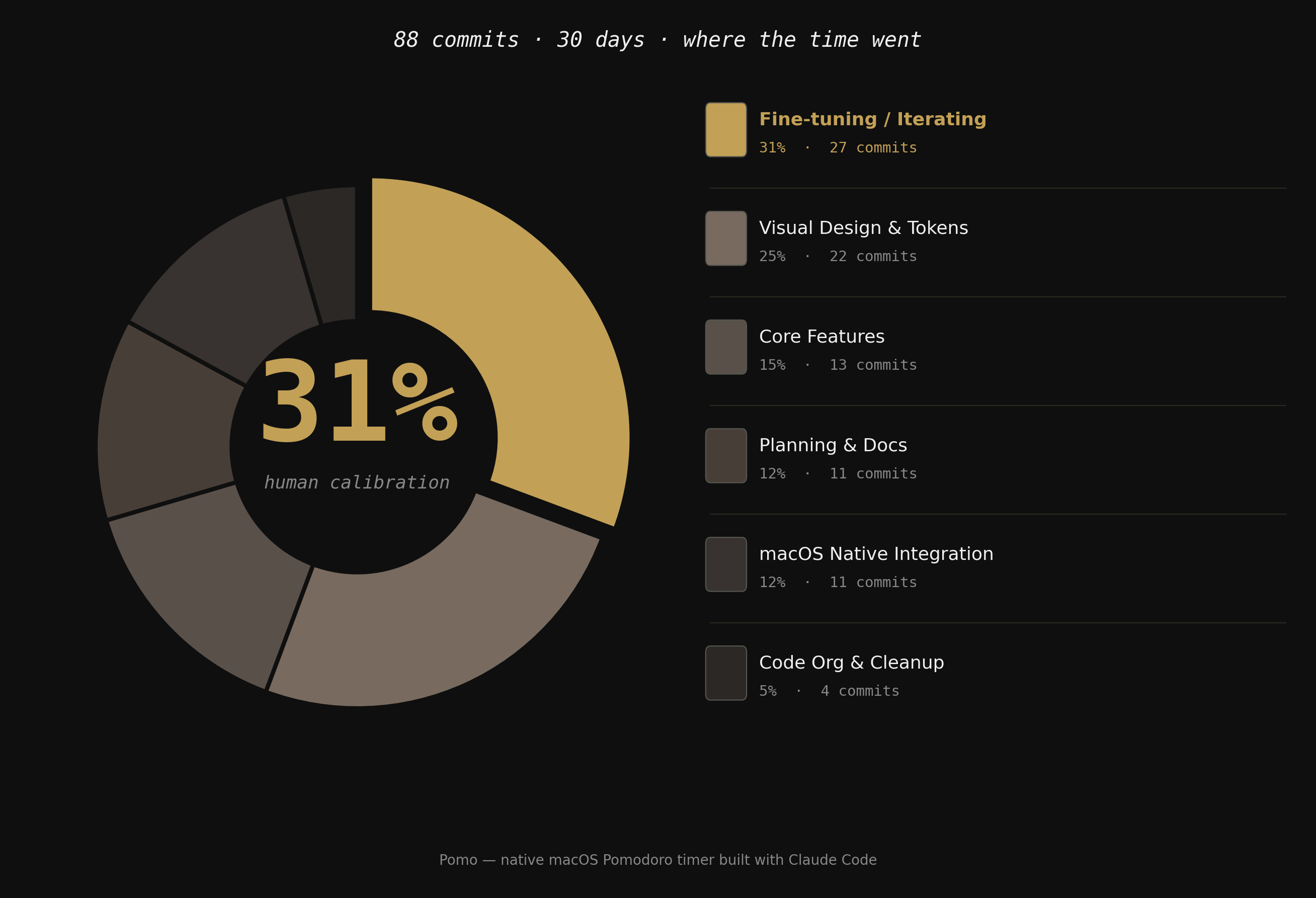
The top category — Fine-tuning / Iterating — is 27 commits where I changed no logic, added no features, and wrote no new architecture. wip. Update AppConstants.swift. Update SecondsRingView.swift. I was adjusting values until something felt right.
31% of all commits were pure calibration.
That’s the answer to the question the ten-minute miracle raises. AI generated the draft. I spent a month calibrating it.
Calibration Is a Craft
Here’s what that actually looked like.
The hover transition on Pomo morphs the window from a circle to a rounded rectangle when your cursor approaches it. CC coded the transition in one pass. It worked.
Then I spent a session figuring out that the animation needed asymmetric timing — fast in (0.1s), slow out (0.5s) — because a snappy entrance feels responsive, and a slow exit feels graceful. The content overlay: always fast, regardless of direction.
CC can’t know that. There’s no spec for it. It lives in the gap between “it works” and “it feels right.”
That gap is 31% of the project.
The gap between “it works” and “it feels right” is yours to own. 88 commits proved it.
But the interesting part isn’t the number — it’s what happens when that gap gets harder to close.
When Prompting Stops Working
As Pomo grew more complex, calibration started breaking down.
Pomo has a state machine: FlowStatus × TimerPhase. Four statuses (not started, running, paused, completed) crossed with four phases (idle, focus, short break, long break). Up to 12 valid states, each with distinct ring behaviors.
I’d tell CC to “make the focus ring look different when paused.” The change would look right. Then I’d notice it had broken the short break state. Fix that — and something else would drift. The more states there were, the further CC’s output drifted from what I’d intended. Not because CC was making mistakes. Because I was asking it to hold a mental model I hadn’t written down anywhere.
I spent a session going in circles — prompting, breaking, fixing, re-breaking — until I understood what was actually wrong. It wasn’t the prompting. It was the specification. I was asking CC to implement a design I hadn’t fully designed.
The fix wasn’t a better prompt. It was building a specification layer in Figma.
I designed each of the 12 valid states explicitly — what the rings looked like, how they filled, what changed between phases. Then I handed those specs back to CC for implementation.
This reframed what Figma is for in an AI workflow. Not mockups. Not visual exploration. State documentation. A precise spec that CC could implement correctly because I had been precise first. I stopped designing how it looked and started designing how it behaved. Figma became a state machine editor, not a mockup tool.
Where It Actually Broke
Not everything resolved that cleanly.
The state machine drift was fixable because I could see it. The harder failures were the ones that took longer to notice. CC has no memory between sessions — every new task starts fresh. It doesn’t know what you decided not to change, or why a particular constant is 0.5 and not 0.3. Without that context, it optimizes for correct. And sometimes correct undoes calibrated.
There were sessions where CC would refactor a file and I’d realize a day later that something I’d carefully tuned had been quietly reset. Not wrong, exactly — just no longer what I’d meant. The diff was clean. The feel was off.
The “do not revisit” list started as a comment in CLAUDE.md. Then it became a section. Then I realized it was the beginning of something I actually needed: a session memory system.
What I Built to Survive It
Two things made the second half of the project dramatically more stable.
AppConstants.swift. One rule, added to CLAUDE.md: never hardcode tuneable values. Everything goes in the config file. Once that was enforced, calibrating meant changing one number in one file. Before that rule, it meant hunting through views — and trusting CC to find the right one.
TASK.md. A living session-handoff document: what was decided, what was ruled out, what the current state was, and what the next task needed to know. CC’s context window doesn’t persist between sessions. TASK.md was the workaround — a structured handoff that gave CC everything it needed to start the next session without drifting from decisions already made. Where AppConstants.swift made calibration faster, TASK.md made it possible at all.
The AppConstants rule made calibration faster. TASK.md made it possible at all.
That’s the second post. [Coming soon: how TASK.md became the working memory of the whole project, and why it’s the most transferable thing I built.]
The 31% Is the Job
AI is fast. The craft is building systems that make it precise, continuous, and honest about its limits.
The calibration — the judgment about what feels right — is irreducibly yours. The 10-minute generation was impressive. But it was a draft. Shipping required:
- Knowing that 0.5s feels graceful and 0.3s feels abrupt
- Knowing that monospace thin weight at sub-60 seconds reads as “urgency” without screaming it
- Knowing that a ring filling clockwise feels like progress and a ring depleting clockwise feels like loss of time
- Knowing when to stop tweaking and call it done
None of that is in a prompt. None of it is in the model. All of it is in the 31%.
The craft of vibe coding isn’t writing better prompts. It’s building the systems — the spec layers, the config files, the session memory — that let you transfer your judgment to the AI precisely enough that it can act on it without drifting.
The craft didn’t disappear. It moved.
Build This Workflow for Your Project
The TASK.md methodology — the session memory system that made this workflow possible across 20+ tasks — is available as a Claude skill.
It helps you set up the same workflow for your own project: task handoffs, architecture snapshots, “do not revisit” decisions, and next-task briefings, all in one living document.
Frequently Asked Questions
What percentage of vibe coding is human work? Based on 88 commits across a month-long project, 31% of all commits were pure human calibration — no new features, no new code, no architecture changes. Just judgment: adjusting values, tweaking timing, refining behavior until something felt right. The percentage will vary by project and by how well the workflow is set up, but the category itself — irreducible human judgment — is always present.
What is the human role in AI-assisted coding? When AI writes all the code, the human role shifts from implementation to calibration and design intent. You’re not writing Swift — you’re deciding that 0.1s feels responsive and 0.5s feels graceful, and that those are different things. You’re specifying state machine behavior precisely enough that the AI can implement it correctly. You’re knowing when to stop tweaking. None of that is in a prompt or a model.
When does prompting stop working in vibe coding? Prompting breaks down when the system you’re building is more complex than what you’ve explicitly specified. In this project, it happened with a state machine of up to 12 valid states — telling the AI to “make the focus ring look different when paused” would fix one state and silently break another. The solution wasn’t a better prompt; it was building a specification layer in Figma first and handing precise specs to the AI for implementation.
How do you prevent AI from undoing calibrated values between sessions? Two things: a config file rule and a session-handoff document. The config file rule (every tuneable value lives in one file, never hardcoded) means calibrating is always one number in one place. The session-handoff document (TASK.md) captures what was decided, what was ruled out, and what the current state is — so the AI can pick up exactly where the last session ended without drifting from decisions already made.
What is a TASK.md file in AI development? A TASK.md is a structured session-memory document that compensates for the fact that AI coding tools have no persistent memory between sessions. It records what’s been decided, what’s been ruled out, what the current state of the project is, and what the next session needs to know. It functions as a living handoff that keeps the AI oriented across dozens of tasks without re-explaining prior decisions from scratch each time.
Tools & Technologies
Tools
- Claude Code — wrote all Swift code across every session; directed via a
CLAUDE.mdproject file - Figma — used as a state machine editor for specifying visual behavior across all 12 app states
- Git — version control; commit history was the source data for the 31% analysis
Technologies
- Swift / SwiftUI — native macOS app stack for Pomo
- macOS — target platform; native window management, menu bar integration, and system sounds
Honorable mentions
- Obsidian